Croccyfocus Documentation (for admins)
What Is Hyperfocus
Hyperfocus is a phenomenon that reflects one's complete absorption in a task, to a point where a person appears to completely ignore or 'tune out' everything else.1
We all know that co-working streams are an absolutely wonderful way of getting work done. Riding that shared wave of motivation and focused productivity makes it so much easier to stay positive as you're knocking over those hard tasks together. But sometimes, we need a little bit more. Ever wanted to tell your chat/colleagues that you really can't talk right now because you need to lock in and finish this assignment due in 3 hours? Ever needed a reminder yourself as you get caught up in some really interesting conversation? Then let's get hyperfocused. (Or take a break, you know, good rest is just as important for productivity as the grind!)
In Croccyfocus, hyperfocus mode is a per-user emote and command only mode.
Any chatter (including mods!) can enter hyperfocus for a given time with the !hyperfocus command (e.g. !hyperfocus 25m).
While they are in hyperfocus, they will only be able to write emojis and commands,
and any other messages will automatically be deleted as a gentle admonition against distraction.
They can come out early with !unfocus, and show other users they are locked in and unable to chat with !hyperfocused.
Their focus session will also be shown on the (optional) on-stream browser widget so everyone can see who is focusing.
Users can also follow each other into hyperfocus by writing !focuswith @user, which will match their hyperfocus timer to the given user.
Adding focus to your channel
Use this link to authorise and invite Croccyfocus: https://croccyfocus.thewisewolf.dev/invite
If your channel has a particularly high level of verification set, you may also need to make croccyfocus a moderator by writing /mod croccyfocus in chat before it can send messages. This is usually not required, since the invite link grants the needed permissions directly, but can be helpful to complement strict moderation settings.
Croccyfocus uses the "delete messages" permission to enforce hyperfocus mode, and uses the "write chat messages as your user" permission to be able to delete your own messages in hyperfocus mode (since only the streamer can delete their own or other moderator's messages).
Croccyfocus will never send chat messages with another user's account, will never delete messages outside of hyperfocus mode, and performs no recording of messages or user information aside from usernames, IDs, commands (and information therein), and temporary logging of messages deleted during hyperfocus for the purpose of confirming and addressing bug reports.
Using Hyperfocus
To enter hyperfocus mode:
!hyperfocus duration-- Hyperfocus for the givenduration, which may be written as any combination of days, hours, minutes, and seconds, and any English abbreviation thereof. E.g.1day 2hrs 10mor10 minutesor1h5mare all accepted.- If no duration is given, the duration will be until the clock reads "10 minutes to the hour", or
:50, in UTC time. (This default is to accommodate a 50/10 pomodoro starting on the hour, and will be customisable in future.)
- If no duration is given, the duration will be until the clock reads "10 minutes to the hour", or
!focuswith @user-- Hyperfocus for the same duration as the given user. (The duration will not be updated if the other user leaves focus early or changes their focus time.)
While in hyperfocus mode, any message which is not either a command or entirely consisting of emojis will be deleted as a gentle encouragement to stay focused. Note that:
- Only Twitch and Unicode emojis are supported, not 7TV emotes.
- Commands are recognised by the message starting with a command prefix such as
!
To leave hyperfocus mode early, the command !unfocus or its alias !uncrocus may be used.
The hyperfocus mode is shared amongst all channels using Croccyfocus, so if you go into focus in one channel, you won't be able to chat in any channel until your focus ends!
User list widget and customisation
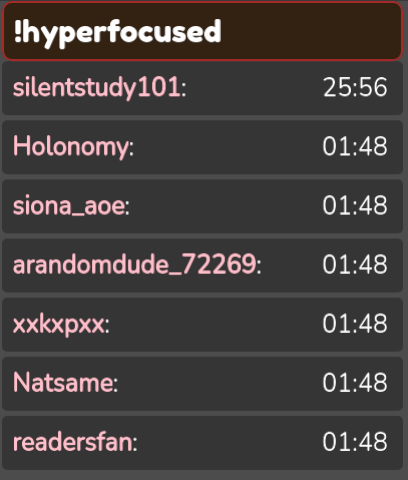
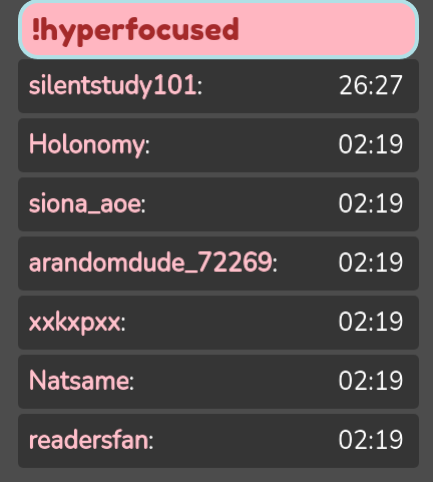
Users can check when their (and others') hyperfocus sessions will end with !hyperfocused or !hyperfocused @user.
However to make it even easier, streamers can add the focuslist widget to their streams,
which displays all the users active in the stream who are hyperfocusing, and when their focus will end.
- Croccyfocus judges whether a user is 'active in the stream' by whether they have written in the stream in the last 4 hours. This criteria may be adjusted slightly in future to better reflect the active users.
To add the widget, use the command !focuslist in your channel to get the browser source link, and then add it as a new browser source to OBS (or other streaming software).
The widget colours, text, and shape may also be fully customised by modifying the CSS in the browser source properties. See Focuslist-v0-Styling for details.
Command Reference
| Command | Description | Example |
|---|---|---|
!hyperfocus [duration] |
Enter hyperfocus mode for duration or until :50 (UTC) |
!hyperfocus 1h 30m |
!focuswith @user |
Enter hyperfocus mode for the same duration as user (has remaining). |
!focuswith @Holonomy |
!hyperfocused [@user] |
Show how long the given user (or yourself) is in hyperfocus for. | !hyperfocused @Holonomy |
!unfocus |
Exit hyperfocus mode early. | !unfocus |
!focuslist |
Show your channel's focuslist browser source link. | !focuslist |
!addfocus |
Show the Croccyfocus invite/authorisation link. | !addfocus |
Afterword
Thank you for using Croccyfocus, produced by Holodoxical Technology Solutions!
We wish you all the best for your hyperfocused sessions, and hope your focus and progress remains positive and strong!
For questions and support, please feel free to reach out to conatum on Discord, or email me at mailto:holo.tech@thewisewolf.dev